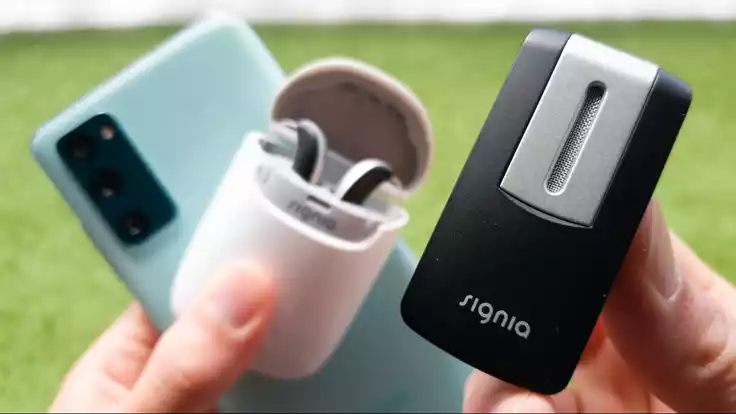
Signia and Rexton hearing aids come with a full ecosystem of wireless accessories that extend what the devices can do in everyday situations. TV streaming, remote microphone support for noisy environments, phone call hands-free use, and discreet volume control are all also possible through the right accessory.
This guide covers every major Signia and Rexton accessory: what each one does, who it helps most, how to set it up, and one important rule that applies to all of them.
The One Rule That Applies to All Signia and Rexton Accessories
Signia chargers and TV Sound work with Signia and Rexton hearing aids. Note: The remote microphone and remote control are brand-specific and are NOT interchangeable between Signia and Rexton. Before purchasing any accessory, confirm it matches your hearing aid brand.
Quick Reference: Which Accessory Does What
| Accessory | Signia Brand | Rexton Brand | Primary Use |
TV Streamer | TV Sound | TV Sound | Stream TV directly to hearing aids |
Remote Mic | Streamline Mic | Smart Mic | Improve speech in noise, hands-free calls |
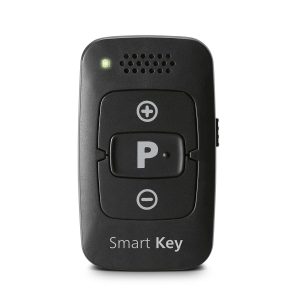
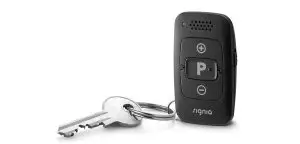
Remote Control | Remote Control | Smart Key / Smart Remote | Volume and program control |
Chargers | Pure Standard / Portable / Dry&Clean | Charging Station / Travel Charger | Recharge hearing aids |
The New TV Streamer: The TV Sound
The TV streamer is the accessory that transforms the TV-watching experience for hearing aid users. Rather than turning the volume up for everyone in the room, the streamer sends audio directly and wirelessly to the hearing aids at whatever volume the wearer needs. Therefore allowing family members to hear the TV at their preferred volume and the hearing aid user hears it at theirs.
What It Does
- Streams TV audio directly to Signia or Rexton hearing aids with Dolby Digital quality
- Multiple users with compatible hearing aids can pair to the same streamer
- Automatically suspends TV streaming when a phone call comes in, then resumes
- Works with TVs that have a TOSLINK optical output, RCA analog (red and white cables), or 3.5mm jack
- LED display shows connection status
- Backwards Compatible with the e to e Signia and Rexton Hearing aids. If you have questions, ask us.
How to Set Up Your TV Sound Streamer
- Step 1: Connect the streamer to a power source and to your TV using the optical, RCA, or jack cable depending on your TV’s available outputs.
- Step 2: open and close the battery doors on your hearing aids, or place them in the charger and take them out if rechargeable. This puts them in pairing mode.
- Step 3: Place the hearing aids on top of the TV Sound for your brand
- Step 4: Wait approximately 30 seconds. The power button turns double blue, then green when pairing is successful.
- Step 5: Put the hearing aids in your ears. Streaming should begin automatically. If not, use your app or a button on your hearing aid or remote control to select the TV streamer program.
You do not need the app to use the TV streamer. However, the Signia or Rexton app lets you adjust the streaming volume and switch programs more conveniently. Ask your audiologist to set up a dedicated TV streaming program during your fitting. You may also use a remote control.
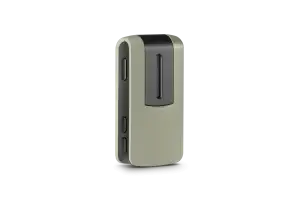
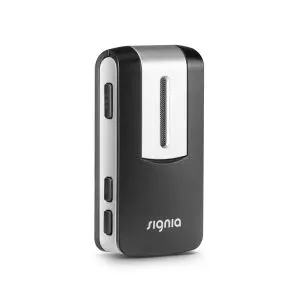
The Remote Microphone: Signia Streamline Mic and Rexton Smart Mic
The remote microphone is one of the most clinically impactful accessories available for Signia and Rexton users. It solves the fundamental problem that hearing aids face: the microphones are in your ears, but the person you want to hear may be across the table, at a podium, or separated by background noise.
The Streamline Mic and Smart Mic transmit the speaker’s voice directly to the hearing aids, bypassing distance and background noise entirely. The signal improvement is significant enough that patients who could not comfortably use the phone with their hearing aids alone often find that the mic transforms the experience.
Three Modes: Remote Mic, Bluetooth Headset, and Remote Control
- As a remote microphone: the featured speaker wears or places the mic near them. Their voice streams directly to the hearing aids. Works up to approximately 60 feet, well beyond the range of the hearing aid microphones. Ideal for lectures, church services, meetings, medical appointments, and restaurant conversations.
- As a Bluetooth headset: pairs to a smartphone and streams phone calls, music, podcasts, and other audio directly to the hearing aids. The mic picks up the wearer’s voice for calls, therefore allowing true hands-free use. Works for walking, cleaning, exercising, without holding the phone.
- As a remote control: when not streaming, functions as a discreet volume and program control for the hearing aids.
Real-World Uses
- Noisy restaurant: clip the mic to your dining companion’s collar. Their voice streams directly to your hearing aids at a comfortable level while background noise stays at a distance.
- Lecture or sermon: the speaker clips the mic to their lapel. Audio streams directly regardless of where you sit in the room.
- Medical appointment: place the mic on the desk near the doctor. Every word streams clearly without straining to hear across the room.
- Conference call: the mic functions as a hands-free headset, picking up your voice and streaming the call audio directly.
- Walking or exercising: stream music or podcasts from your phone without touching it.
A Patient Story
One of our patients has severe hearing loss and wears strong BTE hearing aids. Despite the power of his devices, phone conversations with his grandchildren were consistently difficult. With the Rexton Smart Mic functioning as a Bluetooth headset, he is able to have long, clear conversations with his family. For someone whose hearing loss had been limiting one of his most important relationships, the difference was meaningful.
Setup
- Charge the Streamline Mic or Smart Mic for approximately two hours via USB before first use
- Pair the hearing aids to the mic following the pairing instructions in the packaging
- Pair the mic to your smartphone via Bluetooth for hands-free calling and streaming
- A status indicator light at the top of the device shows the current mode by color. When the indicator turns red, approximately 30 minutes of streaming time remains.
The Streamline Mic and Smart Mic come with a lanyard for wearing around the neck, a charging cable, and an instructional guide. The manufacturer’s warranty covers all parts except the battery.
The Remote Control: Signia Remote and Smart Key / Smart Remote
For patients who prefer physical buttons over a smartphone app, Signia and Rexton both offer compact remote controls that adjust volume and switch programs on the hearing aids.
Signia has released a new dedicated Remote Control accessory, confirmed compatible with Signia’s own current portfolio including MaX. Compatibility with rebranded lines, TruHearing, Rexton, Horizon, and Miracle-Ear, has not been confirmed by Signia. If you wear a rebranded device and want this accessory, contact us to confirm compatibility before ordering.
- Signia Remote Control: pocket-sized, simple buttons for volume up/down and program selection. Compatible with most Signia IX, AX, and X platform hearing aids.
- Rexton Smart Key / Smart Remote: equivalent function for Rexton hearing aids. The Smart Key is more compact; the Smart Remote offers more button options.
Remote controls are particularly useful for patients with limited smartphone access or preference, patients in situations where pulling out a phone is not practical, and patients who want backup control of their hearing aids without relying on app connectivity.
Chargers: The Complete Range
Signia offers the most diverse charger lineup of any hearing aid manufacturer. The right charger depends on your hearing aid platform and your lifestyle. For the complete charger compatibility table across all Signia and Rexton platforms and vertical brands, see our dedicated charger guide.
Standard Chargers (IX and AX Platform)
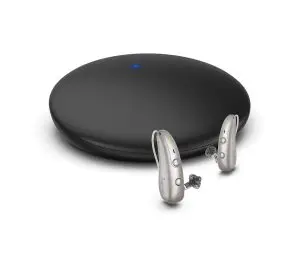
- Pure Standard Charger: plug-in USB charger, hearing aids rest in charging contacts overnight
- Pure Portable Charger: USB charger with built-in battery, allows on-the-go charging without a wall outlet
- Dry&Clean Charger: charges the hearing aids while also using UV-C light and gentle heat to clean and dry them, reducing earwax and moisture buildup
Inductive Chargers (X Platform Only)
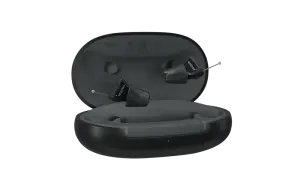
- Inductive Charger: uses electromagnetic induction for X platform hearing aids
- Inductive Charger II: same technology with a lid for added dust protection
Specialty Chargers
- Styletto X Charger: proprietary slim charger for the X platform Styletto
- Styletto AX/IX Charger: proprietary slim charger for AX and IX platform Styletto
- Silk Charger: compact charger for Silk CIC models
- Insio IX Charger: Custom CIC charger
- Insio AX Charger: custom ITE charger for AX platform Insio models
- Motion Charge&Go BTE Charger: for Motion BTE power models
- Dry and Clean Charger: for BTE models.
Accessory Compatibility by Platform
| Accessory | IX Platform | AX Platform | X Platform | Older |
Streamline TV (Signia) | ✅ | ✅ | ✅ | Check |
Smart Transmitter 2.4 (Rexton) | ✅ Reach | ✅ BiCore | ✅ M-Core | Check |
Streamline Mic (Signia) | ✅ | ✅ | ✅ | Check |
Smart Mic (Rexton) | ✅ Reach | ✅ BiCore | ✅ M-Core | Check |
Remote Control (Signia) | ✅ | ✅ | ✅ | Check |
Dry&Clean Charger | ✅ IX/AX | ✅ IX/AX | ❌ | ❌ |
Inductive Charger | ❌ | ❌ | ✅ X only | Check |
Shopping for Signia and Rexton Accessories
We carry Signia and Rexton accessories at Hears Hearing and Hearables, including the Streamline TV, Streamline Mic, Remote Control, Smart Mic, Smart Transmitter 2.4, and also a full range of chargers. If you are not sure which accessory is right for your hearing aids and your situation, our team can help you identify the right match before you purchase.
Frequently Asked Questions: Signia and Rexton Accessories
Can I use Signia accessories with Rexton hearing aids?
No. Signia accessories are brand-specific to Signia hearing aids, and Rexton accessories are brand-specific to Rexton hearing aids. The TV streamer, remote microphone, and remote control are not interchangeable between brands. This applies even though both brands use the same underlying Sivantos technology platform.
What is the difference between the Streamline TV and the Streamline Mic?
The Streamline TV connects to your television and streams audio from the TV directly to your hearing aids. The Streamline Mic is a portable remote microphone that clips to a speaker, pairs to your smartphone, and then streams speech directly to your hearing aids in noisy environments or for phone calls. They serve completely different purposes and are used in different situations.
How does the Streamline Mic work as a Bluetooth headset?
The Streamline Mic pairs to your smartphone via Bluetooth. When paired, phone calls stream directly to your hearing aids and the Streamline Mic’s built-in microphone picks up your voice for the other person to hear. Music, podcasts, and other audio from your phone stream directly as well. This allows truly hands-free use with your hearing aids functioning as wireless headphones.
Do I need the app to use Signia accessories?
No. The TV streamer, Streamline Mic, and remote control all function without the Signia app. The app adds convenience; you can adjust streaming volume and switch programs from your phone, but the accessories work independently. You may need to press a button on your hearing aid or remote control to activate the TV streamer program if it does not start automatically.
What TV connections does the Streamline TV support?
The Streamline TV is compatible with TVs that have a TOSLINK optical output, RCA analog connections (red and white cables), or a 3.5mm headphone jack. Most modern televisions have at least one of these outputs. If you are unsure which output your TV has, check the back panel or your TV’s manual.
Is the Dry&Clean Charger worth it?
For many patients, yes. Beyond charging the hearing aids overnight, the Dry&Clean Charger uses UV-C light and gentle heat to clean and also dry the devices. Therefore, reducing earwax and moisture accumulation in the microphone and receiver. This can extend device lifespan and reduce maintenance issues, particularly for patients who sweat a lot, live in humid environments, or have significant earwax production. It is compatible with IX and AX platform RIC models only. However, older X platform models are not supported.