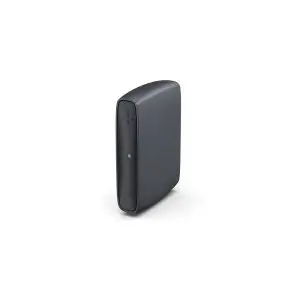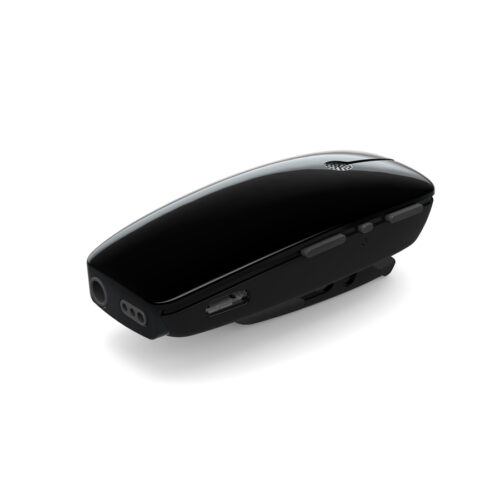
The ReSound Multi Mic+ extends your effective listening range up to 80 feet and lets you direct the signal exactly where you need it, on one speaker’s voice, on a conference table full of participants, or streamed directly from your phone. It is one of the most clinically impactful hearing aid accessories available.
One important update: the classic Multi Mic (for older non-Auracast ReSound hearing aids) has been discontinued and is no longer available. The Multi Mic+ is now the only current remote microphone option from ReSound, and it requires Auracast-ready hearing aids. If you have older ReSound hearing aids and want a remote microphone, read the section below before proceeding.
Important: Does Your Hearing Aid Support Multi Mic+?
The Multi Mic+ requires Auracast-ready ReSound hearing aids. It works with Sensia, Vivia, Savi, and Nexia. It does NOT work with Omnia, One, LiNX Quattro, Key, or older ReSound models. The classic Multi Mic that worked with those older devices has been discontinued and is no longer available for purchase.
If you have older ReSound hearing aids and want remote microphone capability, upgrading to a current Auracast-ready platform is the path forward. Nexia, Savi,Vivia, and Sensia all support the Multi Mic+ and are available at Hears Hearing & Hearables. Our team can help you evaluate whether the upgrade makes sense for your situation.
Three Modes: Remote Mic, Bluetooth Headset, and Table Mic
The Multi Mic+ operates in three distinct modes. Most users discover one or two and never realize the full capability of the accessory they own.
Mode 1: Remote Microphone
Clip the Multi Mic+ to the speaker’s clothing or hang it near them. Their voice streams directly to your hearing aids at a range of up to 80 feet, well beyond the effective range of hearing aid microphones. The signal arrives clearly regardless of the background noise between you and the speaker.
Useful for: lectures, religious services, medical appointments, restaurants, and any situation where the person you want to hear is not directly beside you. Ask the speaker to clip the mic to their lapel. Their voice arrives as though they are speaking directly into your ear.
Mode 2: Table Microphone
Place the Multi Mic+ flat on a table, and it automatically switches to table mode, picking up voices from multiple speakers around the table. Designed for meetings, group conversations, and dinner table situations. The mode switch is automatic, no button press required.
Mode 3: Bluetooth Headset
Pair the Multi Mic+ to your smartphone via Bluetooth. When paired, it streams phone calls, music, podcasts, and audio directly to your hearing aids. The built-in microphone picks up your voice during calls for hands-free use. The mini-jack input also allows a wired connection to computers for Zoom calls and online meetings.
Multi Mic+ and Auracast: Cross-Brand Capability
Because the Multi Mic+ uses Auracast broadcasting, it can stream to any Auracast-compatible hearing aids simultaneously, including hearing aids from other manufacturers. A group of hearing aid users wearing different brands can all receive from the same Multi Mic+ at their own preferred volumes.
ReSound, Jabra, Beltone, Starkey, and Oticon users with Auracast-enabled hearing aids can all receive from the same Multi Mic+ at the same time. This cross-brand capability is one of the most significant practical advantages of Auracast; the speaker wears one mic, and every compatible hearing aid user in the room benefits regardless of brand. See the ReSound compatibility guide.
Patient Stories: What the Multi Mic Actually Enables
The Ceiling Mic
One of our patients loved her ReSound hearing aids but struggled with her religious meetings, which were conducted in quiet, reverberant spaces. Her husband’s solution: drop the Multi Mic down on a string from the ceiling at head height near the speaker. His wife never missed a word in those quiet meetings. The signal went directly from the optimal room position to her hearing aids, bypassing the acoustics entirely.
This is the kind of creative application the Multi Mic+ enables when you understand what it can do. It is not just a clip-on mic for restaurants. It is a flexible, mobile signal source that can be positioned anywhere within 80 feet.
The Bathroom Moment
During a fitting session, a new hearing aid user went to the restroom while her husband and our audiologist stayed in the clinic, forgetting the mic was still active. When she returned: ‘I heard every word you both said.’ Then, worried: ‘Could you hear me?’ We laughed. She loved her remote mic from that day forward.
The 80-foot range is genuinely impressive in practice. The Multi Mic+ transmits through walls and around corners with remarkable clarity. When the mic is active, assume everything within range is being broadcast to the hearing aids.
Real-World Situations Where Multi Mic+ Changes the Experience
- Restaurants: ask your dining companion to clip the mic to their collar. Their voice streams directly while background noise stays ambient. The signal-to-noise improvement is dramatic.
- Lectures and presentations: ask the speaker to wear it as a lapel mic. Sit anywhere in the room and receive directly.
- Religious services: place near the speaker or use the ceiling method. Works for sermon, choir, and announcements.
- Medical appointments: place on the desk between you and the doctor. Every word streams clearly.
- Zoom and online meetings: connect via mini-jack to your computer’s headphone output. Audio streams to your hearing aids while the mic picks up your voice.
- Walking and exercising: stream music or podcasts from your phone hands-free.
- Driving: receive navigation and calls directly in your hearing aids via Bluetooth.
Setup Instructions
Initial Charge
- Charge for at least three hours via USB before first use
- Allow a full three hours, even if the indicator shows a full charge earlier
- The battery performs best after being drained and fully recharged two or three times
- Cannot be overcharged, can be left connected overnight
Pairing to Your Hearing Aids
- Turn on by pressing and holding the power button
- Automatically pairs to compatible Auracast-ready ReSound hearing aids connected to your Smart 3D app
- A tone in your hearing aids confirms a successful connection
- Volume controls are on the side of the device
Pairing to Your Smartphone
- Go to your phone’s Bluetooth settings with the Multi Mic+ powered on
- Select it from the available devices list
- Calls and audio stream automatically once paired
- Red status indicator means approximately 30 minutes of streaming time remaining
Exiting the Stream
- Press and hold the program or toggle button on your hearing aids
- An auditory signal confirms return to standard hearing aid program
Care and Maintenance
- Clean with a dry cloth, no moisture or cleaning solutions
- Turn off and store when not in use
- Keep away from excessive moisture and heat
- Comes with lanyard, carrying pouch, charging cable, and instructional guide
- The manufacturer’s warranty covers all parts except the battery
If you have older ReSound hearing aids and have been relying on the classic Multi Mic, its discontinuation may be the right prompt to consider upgrading. Nexia, Savi, Vivia,,and Sensia all support Multi Mic+ and bring Auracast alongside it. Our team can help you evaluate the upgrade path without any obligation.
Frequently Asked Questions: ReSound Multi Mic+
Is the original ReSound Multi Mic still available?
No. The classic Multi Mic for non-Auracast ReSound hearing aids (Omnia, One, LiNX Quattro, Key) has been discontinued and is no longer available for purchase. The Multi Mic+ is now the only current ReSound remote microphone option. It requires Auracast-ready hearing aids, Vivia, Savi, or Nexia.
I have older ReSound hearing aids. Can I still get a remote microphone?
Not with the current Multi Mic+, which requires Auracast-ready hearing aids. The classic Multi Mic that worked with older models is discontinued. If remote microphone capability is important to you and you have Omnia, One, or older ReSound hearing aids, upgrading to Sensia, Vivia, Savi, or Nexia is the path to getting the Multi Mic+ working for you. Contact our team and we can help you evaluate whether the upgrade makes sense.
What hearing aids does Multi Mic+ work with?
Multi Mic+ works with Auracast-ready ReSound hearing aids: Vivia, Savi, and Nexia. It also works with Auracast-ready GN family hearing aids including compatible Jabra and Beltone models. It does not work with Omnia, One, LiNX Quattro, Key, or older ReSound devices.
How far does the Multi Mic+ reach?
Up to 80 feet as a remote microphone. This allows the speaker to be across a large room, at a podium, or in an adjacent space while their voice streams clearly to the hearing aids.
Can Multi Mic+ stream to hearing aids from different brands?
Yes. Multi Mic+ uses Auracast broadcasting, an open standard. Any Auracast-compatible hearing aid, regardless of brand, can receive from the Multi Mic+ simultaneously. A group with ReSound, Jabra, Starkey, and Oticon Auracast-enabled hearing aids can all receive from the same Multi Mic+ at their own preferred volumes.
Can I use Multi Mic+ as a Bluetooth headset?
Yes. Pair the Multi Mic+ to your smartphone via Bluetooth. Phone calls, music, podcasts, and audio stream directly to your hearing aids. The built-in microphone picks up your voice during calls for hands-free use. The mini-jack input allows wired connection to computers and tablets for Zoom and other meetings.