Hearing Aid Receivers: Then and Now; What You Need to Know in 2026
If your hearing aid has ever stopped working, you know how frustrating it can be. The good news is that the fix is usually simpler than you think, and it often comes down to one small part: the wax guard or the receiver.
This guide walks through what a receiver is, how replacing one has changed over the years, and what you can do right now to troubleshoot your hearing aid before assuming the worst.
Replacing a Receiver Used to Be a Big Deal
Receivers used to be attached with tiny pins that had to be carefully pulled out, often under a microscope. Drop a pin, and you needed a backup on hand because they were so easy to lose. Most patients could not do this themselves, so every receiver change meant a clinic visit. It was slow, fiddly, and definitely not a DIY job.
Today: Quick, Tool-Free Changes
Modern hearing aid receivers are designed for simple, largely tool-free replacement. We still see patients every day with a bad receiver, but fixing it now is a different experience entirely from the pin-and-microscope era.
Here is how we approach it when someone calls and says their hearing aid is not working.
Step 1: Check the Wax Guard
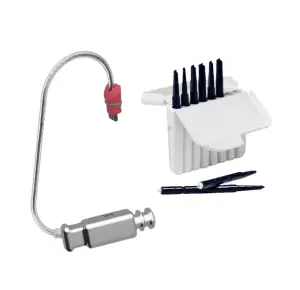
Our first question is always whether the wax guard has been changed recently. Wax guards are tiny filters that prevent earwax from blocking the receiver, and a clogged wax guard is the single most common reason a hearing aid suddenly stops working. It happens to everyone at some point. It is always worth checking first because it is the easiest possible fix.
Step 2: Swap the Receiver
If the wax guard looks fine and the hearing aid still is not working, the receiver itself is the next most likely culprit. Most of the time, replacing it solves the problem immediately.
- Gently pull the receiver from the top of the hearing aid; it should slide out without force
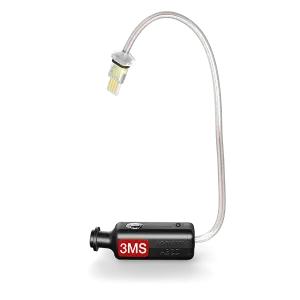
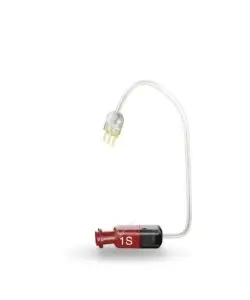
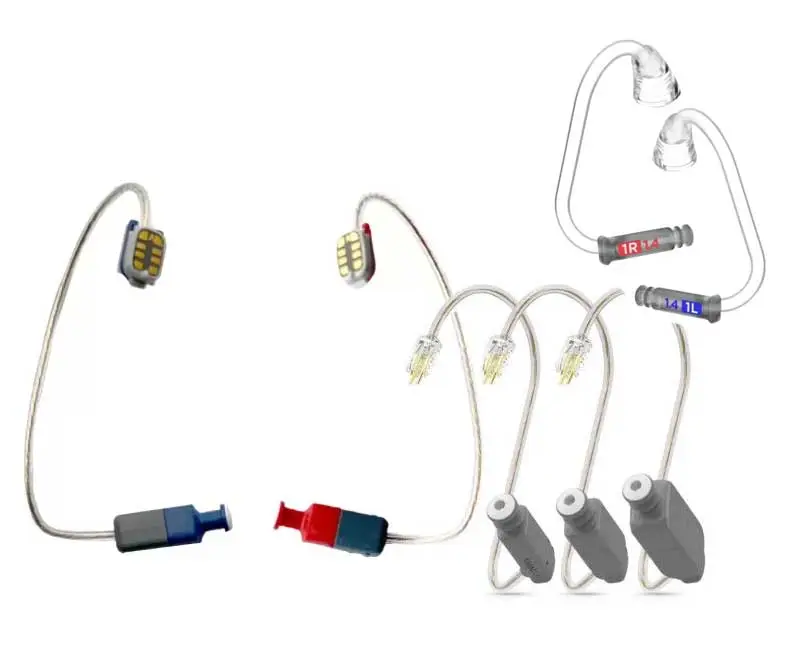
- Check the size number printed on the silver part of the receiver
- If you cannot read the number, contact us or send a photo, and we will identify it for you
- Order the exact same size and brand of receiver; nothing else will fit correctly
Red marks the right ear. Blue marks the left ear. This color coding is standard across most brands and is the fastest way to confirm you are reordering the correct side.
When to See a Professional
If swapping the receiver does not resolve the issue, it is time to bring the hearing aid into the clinic. At that point, there may be a more significant problem that needs professional troubleshooting.
One important caution: if your hearing aid does not feel powerful enough, do not simply swap in a bigger receiver on your own. A receiver mismatched to your actual prescription can cause more harm than good. Instead, ask about reprogramming the device to your needs, or talk to us about a genuine upgrade to a more powerful receiver. This is a decision a professional should make to protect both fit and performance.
Use the Exact Match for Your Brand and Model
Receivers and wax guards are brand-specific and often platform-specific within the same brand. Mixing and matching across brands or models does not work, even when parts look similar. The compatibility list below covers the receivers and wax guards for the platforms we see most often.
Receiver and Wax Guard Compatibility by Brand
Phonak
- Audeo Lumity, Paradise, Marvel: Receiver 5.0 with Phonak CeruStop wax guards. The earlier 4.0 receiver was replaced by the improved 5.0, and both share the same 3-prong connection and are interchangeable.
- Audeo Infinio, Infinio Sphere, Infinio Ultra: Receiver 6.0 with Phonak CeruStop, the latest Infinio-generation receiver.
- MAV / Lumity ActiveVent: ActiveVent 5.0 with SlimTip Link AV and ActiveVent wax guards, includes a special SlimTip adapter.
- MAV / Infinio ActiveVent: ActiveVent 6.0 or SlimTip Link AV with ActiveVent wax guards.
Signia and Rexton
- Signia AX, IX; Rexton BiCore, Reach: Signia/Rexton 3.0 Receiver with matching 3.0 wax guards, compatible with newer RIC models.
- Signia X, Nx, Primax; Rexton M-Core and earlier: Signia/Rexton 2.0 Receiver with matching 2.0 wax guards. This older receiver style requires a pin-pop tool to remove.
ReSound
- LiNX 3D, Quattro: ReSound SureFit 2 Receiver. ReSound has one style of wax guard so all receivers are compatible with the same ReSound wax guards.
- ReSound One, Nexia, Vivia, Savi (non-M&RIE): ReSound SureFit 3 Receiver, for newer RICs through 2025.
- ReSound One, Nexia, Vivia, Savi M&RIE: ReSound M&RIE Receiver, which has a built-in microphone and requires specific M&RIE mic filters along with the standard wax guards.
Widex
- Dream, Unique, Beyond, Evoke, non-rechargeable Moment, Magnify: Widex V1 (EasyWear) Receiver with Widex wax guards, available in sizes 0 through 4 and S/M/P power levels.
- Rechargeable Moment, SmartRIC, Allure: Widex V2 (EasyWear) Receiver, sizes 0 through 4, M/P power levels. Widex has only one type of wax guards compatible across both receiver styles.
Starkey
- Livio AI, Evolv, and other RIC series: Starkey SnapFit (Original) Receiver with Starkey Hear Clear wax guards, sizes 1 through 5, available in universal packs.
- Edge AI, Genesis AI, Omega AI: Starkey SnapFit 2.0 Receiver with Hear Clear wax guards.
Unitron
- Moxi Vivante V-R/RT, North, Tempus (3-prong): Unitron 4.0 to 5.0 Receiver with Unitron CeruStop wax guards, sourced through the shared Sonova supply network.
- Moxi Smile (S-R/RT): Unitron 6.0 Receiver with Unitron CeruStop wax guards, the same supply line as the Phonak 6.0 receiver.
Do not mix and match receivers, wax guards, or domes across different brands or models, even when parts appear similar. If you are at all unsure which part matches your hearing aid, send us a photo of the device or the part number, and we will confirm before you order.
Extra Supplies and Member Pricing
We also offer bundle pricing on receivers and wax guards together, a wide selection of domes and tips matched from a photo if you are not sure of the exact part, and member pricing that makes routine maintenance like this affordable to handle yourself rather than scheduling a clinic trip every time.
Step-by-Step Video Help
If you prefer to see the replacement process visually, our YouTube page has how-to videos for several common brands and models, and a general search for your specific hearing aid brand and model will usually turn up additional tutorials. If you cannot find a video for your exact device, let us know and we can put one together.
A hearing aid that has stopped working does not automatically mean an expensive repair. Most of the time it is the wax guard or the receiver, both of which you can replace yourself with the right part in hand. Contact us with your brand and model if you are not sure which receiver or wax guard you need.