The Phonak Roger system is the most widely used assistive listening technology in classrooms, and one of the most effective tools available for adults who struggle to hear in noise or over distance. It works by transmitting the speaker’s voice wirelessly and directly to hearing aids or cochlear implants, bypassing the distance, reverberation, and background noise that hearing aids alone cannot fully address.
This guide covers every Roger accessory, how each one is used, the receiver options that make Roger compatible with virtually any hearing aid brand, and an honest assessment of when Roger is the right investment versus when a simpler solution will do.
What the Roger System Does and Why It Is Different
Hearing aids amplify sound from the microphones on the devices, which sit behind or in the ear. In a noisy room or at a distance, the signal-to-noise ratio — the difference between what you want to hear and the background — is poor, and no amount of amplification fully compensates.
The Roger system solves this differently. A Roger microphone is placed near the speaker’s mouth. It transmits that voice signal digitally on a 2.4 GHz wireless connection directly to the listener’s hearing aids. The speaker’s voice arrives at near-full strength regardless of distance, reverberation, or background noise level.
Roger technology operates with extremely low latency; audio transmission occurs nearly instantaneously, preventing any detectable delay between the original sound and what the listener hears. This is particularly important in educational settings where timing of auditory input is critical for speech and language development.
Roger vs a Standard Remote Microphone: When You Need Which
Most major hearing aid brands offer their own proprietary remote microphone: ReSound’s Multi Mic+, Signia’s Streamline Mic, Starkey’s Remote Microphone+. These are excellent accessories for one-on-one and small group listening and cost significantly less than a Roger setup.
The key difference is multi-user capability. A standard remote microphone creates a connection between one microphone and one pair of hearing aids. Roger technology allows unlimited hearing devices to connect to a single Roger microphone simultaneously. This makes Roger the right choice for:
- Classrooms where one student or multiple students with hearing loss need to receive the teacher’s voice
- Group meetings where the listener needs to receive multiple speakers through a shared system
- Children with hearing loss who need guaranteed access to speech in educational settings
- Cochlear implant users who need Roger’s stronger signal processing
For most adult one-on-one and restaurant situations, a brand-specific remote microphone is more practical and significantly less expensive. Roger’s premium is justified by the multi-user, classroom, and educational use cases where no alternative matches it.
Roger Accessories: Every Device Explained
Roger On iN
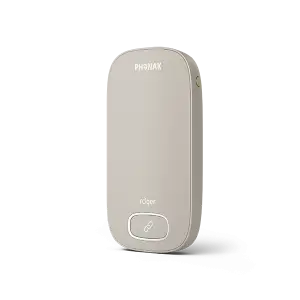
The most versatile Roger microphone for adult use. The Roger On iN has three microphones and automatically detects its orientation, held upright, placed flat on a table, or pointed at a speaker, and adjusts its pickup pattern accordingly.
- Clip-on mode: worn clipped to the speaker’s clothing for direct one-on-one conversation. Transmits the primary speaker’s voice over distance and background noise.
- Table mode: placed flat on a table, it automatically switches to omnidirectional pickup, capturing multiple speakers around the table. Ideal for family dinners, game nights, and meetings.
- Pointing mode: aimed at a speaker across a room to focus pickup in a specific direction.
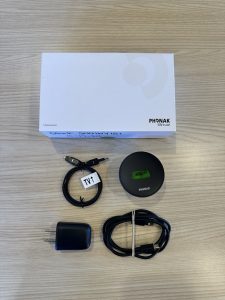
- With docking station: connects to a TV or computer audio source for direct streaming. The Roger On iN becomes a TV streamer when docked, eliminating the need for a separate TV streamer accessory.
The Roger On iN is the most expensive of the individual Roger microphones but the most flexible; one device covers most adult use cases. The iN suffix indicates built-in RogerDirect receivers for Phonak hearing aids with that capability.
Roger Select iN
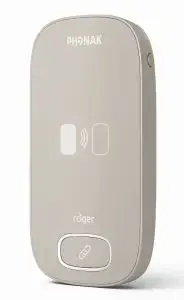
Designed specifically for group table conversations. The Roger Select automatically identifies the loudest active speaker around the table and prioritizes their voice, switching focus as the conversation moves.
- Best for: dinner table conversations, board games, meetings with multiple participants, and restaurant situations with a defined group.
- With a docking station: streams TV and computer audio directly, same as the Roger On iN.
- Select vs On iN: the Select is optimized for table-based group conversation. The On iN is more versatile across multiple environments. If your primary use is a dinner table or meeting room, the Select is the right choice.
Roger Clip-On Mic
The simplest and most affordable Roger microphone for personal use. Clips to a partner’s clothing and transmits their voice directly to the listener’s hearing aids at close range.
- Best for: one-on-one conversations with a partner, caregiver, or family member at home. Listening to a partner while moving around the house.
- Limitation: designed for a single speaker at a time. Not suited for group conversations or dynamic environments where speakers change frequently.
Roger Table Mic II iN
Designed for group meetings and collaborative work settings. The Roger Table Mic II sits on a conference table and automatically focuses on the active speaker as conversation moves around the room.
- Best for: group projects, conference calls, business meetings, and study sessions with multiple participants.
- Multiple units: Several Roger Table Mic II units can be networked together in larger rooms to ensure coverage regardless of where speakers are seated.
Roger Accessories for Educational Settings
Roger Touchscreen Mic
The primary classroom Roger microphone for educational use. The teacher wears or holds the Touchscreen Mic, and the student’s hearing aids receive the teacher’s voice directly regardless of where in the classroom the student is seated.
- Multiple students: one Touchscreen Mic can transmit simultaneously to unlimited students with compatible Roger receivers in the classroom.
- Pass-around microphones: connect with Roger pass-around microphones so that peer voices during class discussions are also transmitted to the student with hearing loss.
- Multimedia Hub: connects with the Roger Multimedia Hub to mix teacher voice with video or computer audio simultaneously.
Roger Pass-Around Microphones
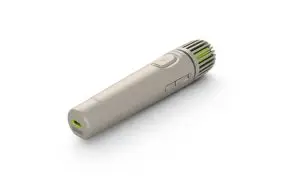
Small handheld microphones passed between students during class discussions, Q&A sessions, and group activities. When a peer speaks into the pass-around mic, their voice is transmitted directly to the student with hearing loss alongside the teacher’s voice.
- Best for: classrooms where peer participation is important and the student needs access to voices from all directions in the room.
- Works with: Roger Touchscreen Mic, Roger DigiMaster SoundField System, Roger Multimedia Hub.
Roger Multimedia Hub
A mixing device that combines audio from multiple sources, a teacher’s microphone, a computer, and a video feed, and transmits the combined signal to the student’s hearing aids. The student receives both the teacher’s commentary and the media audio without missing either.
- Best for: classrooms using presentation technology, streaming video, or computer-based instruction alongside live teaching.
Roger DigiMaster SoundField System
A classroom sound field amplification system that distributes the teacher’s voice through speakers throughout the room, benefiting all students, not just those with hearing loss. Works with the Touchscreen Mic and pass-around microphones for a complete classroom hearing access solution.
Roger Receivers: How Roger Connects to Your Hearing Aids
A Roger microphone transmits a signal. A Roger receiver in or connected to the hearing aid receives it. The right receiver depends on which hearing aids you have. Check out our Roger compatibility guide to learn more!
RogerDirect: Built Into Phonak Hearing Aids
Modern Phonak hearing aids, including Marvel, Paradise, Lumity, Infinio, and Infinio Sphere, have RogerDirect capability built into the hearing aid chip. Roger microphones transmit directly to these aids without any external receiver or attachment.
- Roger Unlimited: all current Roger microphones now ship with built-in unlimited Roger receivers for RogerDirect-compatible Phonak aids. No separate receiver purchase needed. Setup can be completed without a hearing care professional, though professional assistance is always available.
Roger X: Universal Receiver for Non-Phonak Hearing Aids
The Roger X is a small universal receiver that connects to hearing aids, cochlear implants, or assistive devices with a Direct Audio Input (DAI) port or compatible streamer. This allows Roger technology to work with most hearing aids regardless of brand.
- Compatibility: works with hearing aids that have a DAI shoe attachment, which includes most battery-powered hearing aids. Also compatible with streamers that have a receiver port, such as certain ReSound and Oticon accessories.
- Setup: requires programming by an audiologist. Professional setup fees apply.
Roger NeckLoop: For Telecoil-Enabled Hearing Aids
The Roger NeckLoop transmits the Roger signal via electromagnetic induction to hearing aids equipped with a telecoil. The user wears the NeckLoop around their neck and activates the telecoil program on their hearing aids.
- Best for: patients with telecoil-enabled hearing aids who want Roger compatibility without an external receiver attachment.
- Limitation: newer, smaller hearing aids often do not include a telecoil. Confirm your hearing aids have a telecoil before purchasing a NeckLoop.
Roger Design-Integrated Receivers
Custom receivers designed for specific Phonak hearing aid models and cochlear implants from Cochlear, MED-EL, and Advanced Bionics. Available in different colors to match hearing aids. Your audiologist can confirm which integrated receiver is appropriate for your specific devices.
Honest Cost Considerations
The Roger system is powerful and the most widely validated assistive listening technology for educational use. It is also expensive. A complete classroom setup, Touchscreen Mic, pass-around microphones, and receivers for the student, represents a significant investment.
- Schools may already have equipment: many school districts provide Roger equipment for eligible students. Consult with your child’s school and audiologist before purchasing. You may not need to buy anything.
- Roger for adults: for most adult one-on-one and social situations, a brand-specific remote microphone is substantially less expensive and equally effective. Roger’s cost premium is most justified for educational use, cochlear implant users, or adults who regularly navigate large group situations where multiple listeners need simultaneous access.
- Test before committing: Roger’s accessories are expensive enough that trying before buying is worthwhile. If the use case does not deliver the expected benefit, return the device before the return window closes.
Not sure whether Roger is the right system for your situation or whether a simpler and less expensive remote microphone will serve your needs? Contact Hears Hearing & Hearables to discuss before purchasing.
Auracast and the Future of Broadcast Listening
The Phonak Roger system fills a gap that will gradually narrow as Auracast technology matures. Auracast is a Bluetooth LE Audio broadcast standard that allows one transmitter to stream to unlimited compatible receivers simultaneously, without pairing, the same multi-user capability that makes Roger valuable in classrooms.
As Auracast infrastructure spreads to public venues, classrooms, and workplaces, some of Roger’s use cases will be addressed by native Auracast streaming to hearing aids. ReSound Vivia and Nexia, Starkey Edge AI, and Oticon Intent all have Auracast activated or hardware-ready. Phonak Infinio hardware is Auracast-ready pending activation. Roger will remain the validated, purpose-built educational solution for the foreseeable future, but Auracast represents the longer-term direction for broadcast hearing access.
Frequently Asked Questions: Phonak Roger System
What is the Phonak Roger system?
The Phonak Roger system is a wireless microphone system that transmits a speaker’s voice directly to hearing aids or cochlear implants, bypassing the distance, background noise, and reverberation that hearing aids alone cannot fully overcome. It operates on a 2.4 GHz digital wireless signal with extremely low latency. Roger is the most widely used assistive listening technology in educational settings and is also used by adults in noisy environments and group situations.
Do I need Phonak hearing aids to use Roger?
No. Roger is compatible with virtually any hearing aid or cochlear implant through different receiver options. Phonak hearing aids with RogerDirect use the system without any external attachment. Hearing aids with a Direct Audio Input port use the Roger X universal receiver. Telecoil-enabled hearing aids use the Roger NeckLoop. Cochlear implants from Cochlear, MED-EL, and Advanced Bionics have dedicated Roger design-integrated receivers.
What is the difference between Roger On iN and Roger Select?
Both are personal Roger microphones for adult use. Roger On iN has three microphones and automatically adjusts between clip-on, table, and pointing modes, making it the most versatile option for varied environments. Roger Select is optimized specifically for group table conversations, automatically prioritizing the loudest active speaker. If your primary use is dinner tables and meetings, the Select is the right choice. If you want one device that handles most situations, the Roger On iN is more flexible.
What is RogerDirect?
RogerDirect is the capability built into modern Phonak hearing aids (Marvel, Paradise, Lumity, Infinio) that allows Roger microphones to transmit directly to the aids without any external receiver. With Roger Unlimited, all current Roger microphones include built-in receivers for RogerDirect-compatible aids, and setup no longer requires a hearing care professional for Phonak users.
Is Roger worth the cost for adults?
It depends on the use case. For adults who primarily need help in one-on-one conversations and restaurant situations, a brand-specific remote microphone is significantly less expensive and equally effective. Roger’s cost premium is most justified for educational use, cochlear implant users, and adults who regularly face large group situations where multiple listeners need simultaneous access to the same audio source. Contact our team to discuss which option is most cost-effective for your specific situations.
How does Roger connect to non-Phonak hearing aids?
The Roger X universal receiver connects to hearing aids, cochlear implants, or compatible streamers with a Direct Audio Input (DAI) port. The Roger NeckLoop uses induction to connect to hearing aids with a telecoil. Cochlear implant users from Cochlear, MED-EL, and Advanced Bionics have dedicated design-integrated receivers. Setup for non-Phonak devices requires programming by an audiologist.